Build log
I Built My Own TV Launcher
A modded APK killed my last TV. I wasn’t letting anyone else’s code near the new one’s home screen, so I wrote my own.
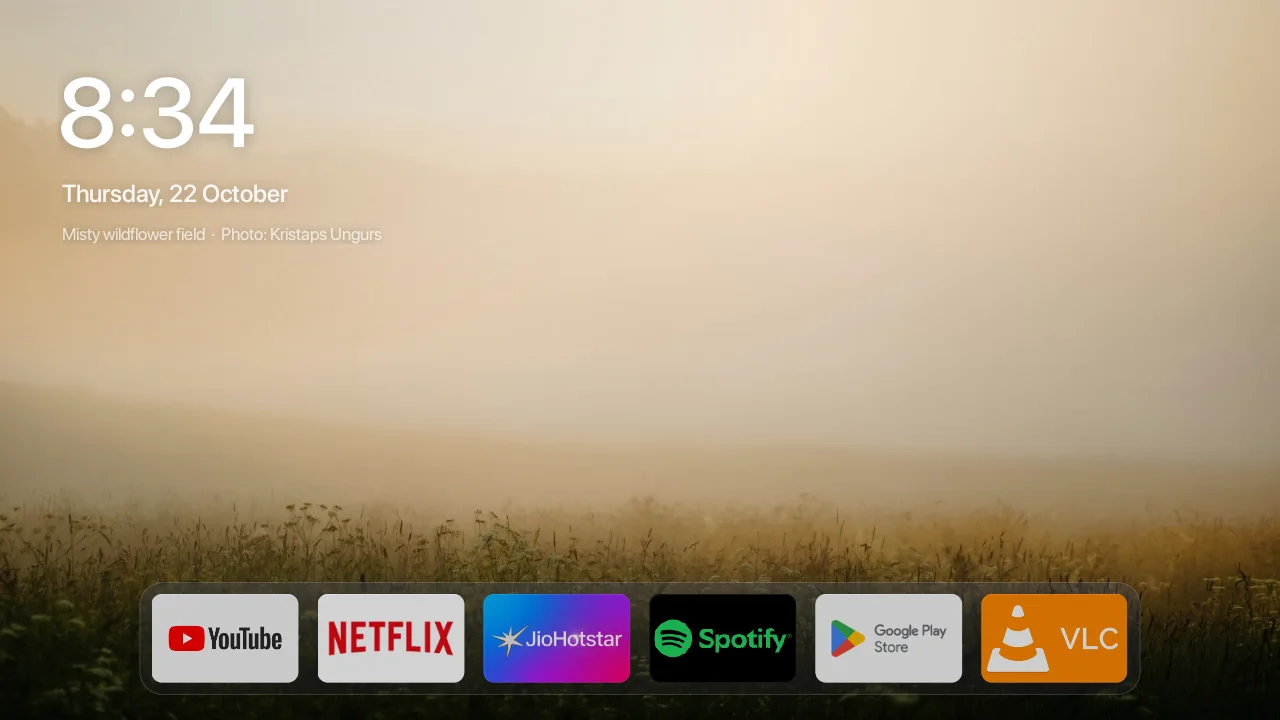
My TV’s home screen was mostly ads. Rows of shows I’d never watch, a Shop tab, a Discover tab, and Xiaomi’s PatchWall jumping out of sleep to show me more of them. The obvious fix is a custom launcher from somewhere on the internet. The last time I installed an app from somewhere on the internet, I lost a TV.
the last tv died to an apk
The short version: I sideloaded a modded Spotify APK. It ran fine. Then the home screen started crashing in a loop, so I did what the forums said and factory reset it from recovery. It never booted again. The fix was a whole new mainboard, a Mi TV 4A board swapped into the old panel, and the swap broke Wi-Fi on the way in. It’s been on a LAN cable ever since.
So when I finally decided the ads had to go, the rule was simple. Nothing gets installed that I can’t read, and nothing changes on the TV that I can’t undo exactly.
first, get the junk out, reversibly
Before any launcher, I wrote a debloat script with one hard limit: it only ever disables apps, never uninstalls them. Disabling is the same thing as pressing Disable in the TV’s own settings. It’s undone with one command, and a factory reset undoes it too.
It runs as a dry run by default, so you see the whole plan before anything happens. I took a full backup of every package and setting, then disabled things in small batches: analytics, Xiaomi’s statistics service, the feedback and bug-report senders, the manual, the music and gallery apps, the screensaver. After every batch I used the TV for a bit before moving on. Nineteen apps in total. The stock launcher itself I never touched.
why not just install a launcher
There are decent ones out there. But every one of them is somebody else’s APK asking to become the first thing that runs on my TV, every time it turns on. After the last one, no thanks. I’d rather build something small enough to read in an evening.
So Bare has no dependencies at all. No Gradle, no libraries, no Play Services. A shell script turns the Java into an APK with the Android SDK’s own tools, and the whole app is about a dozen files. I designed all of it on my laptop first. A test harness renders the real launcher to screenshots on my machine, so the TV didn’t see a single build until I liked what I was looking at.
the netflix row that can’t exist
The plan was Apple TV’s Top Shelf: focus Netflix, and the top of the screen fills with what you’re watching. Android TV apps do publish those rows. But reading them needs a permission called ACCESS_ALL_EPG_DATA, and on my TV that one is signature-or-privileged. Only launchers baked into the firmware get it.
So instead of a recommendation wall, Bare shows a photograph. Nineteen of them, actually, picked from Unsplash: Ladakh lakes, fog over forests, a still ocean. A new one every fifteen minutes. Press Up and the apps slide down to the bottom edge, so the picture gets the whole screen. Leave the remote alone for a minute and it does that by itself.
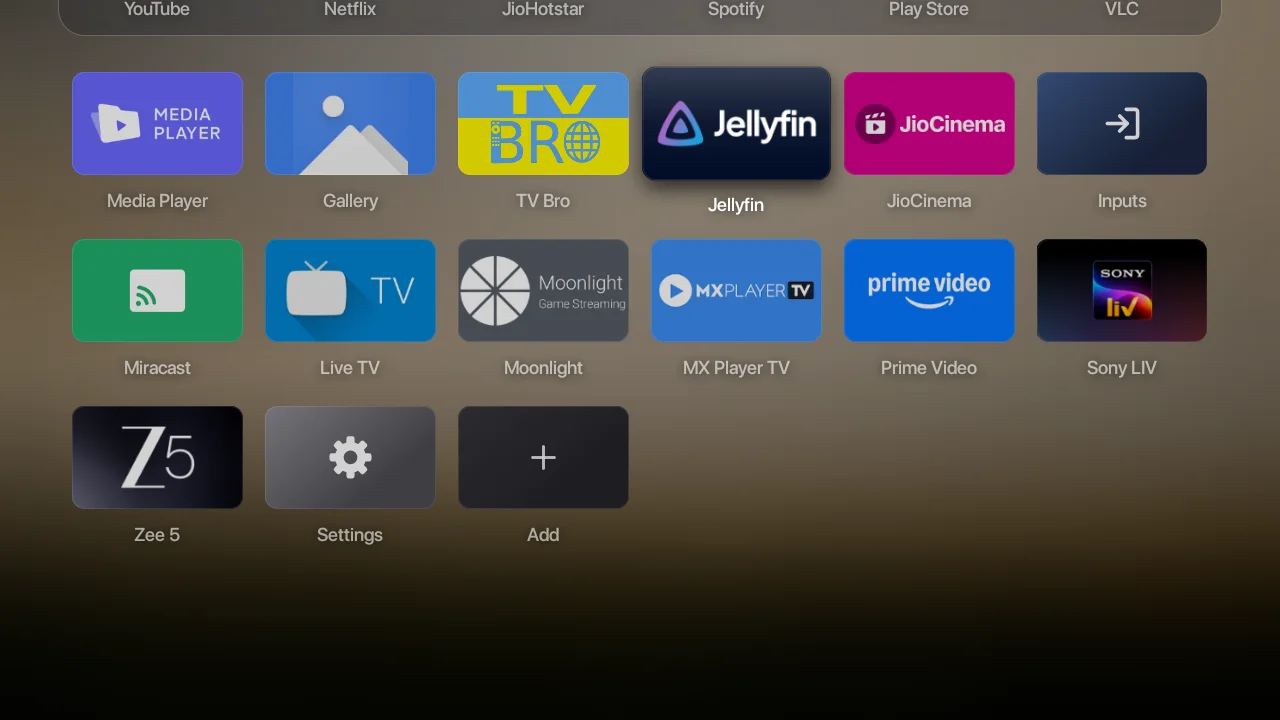
OMFG THIS IS LOVELY VRO
me, the first time it ran on the actual TV
android tv will not let you leave
Here’s the part nobody tells you. You can set any app as the default home screen, Android says Success, and absolutely nothing changes. My TV’s stock launcher declares its Home filter with priority=2. Apps you install can’t go above zero, and Android only listens to your choice when the priorities are tied. So the stock launcher wins every time.
The usual fix is disabling the stock launcher. I didn’t want that. It’s the one app guaranteed to work if mine ever doesn’t. So Bare has a tiny accessibility service instead. It catches the Home button and opens Bare, and if the stock screen shows up anyway, after a reboot for example, it switches to Bare. It reads nothing on screen. If Bare ever crashes and keeps getting sent back, the service gives up after three tries in twenty seconds, so I can never get stuck in a loop.
Then Xiaomi got one more in. My TV’s Settings app has no Accessibility screen at all; they took it out. So the switch gets flipped from a laptop instead:
bash# let Bare answer the Home button
adb shell settings put secure enabled_accessibility_services dev.bare.launcher/.HomeKey
adb shell settings put secure accessibility_enabled 1

# and to undo it
adb shell settings delete secure enabled_accessibility_services
25 fps to 60
The first build that ran on the TV was pretty and laggy. The TV’s own frame stats said a median of 40 ms a frame, about 25 fps, with 86% of frames late. Almost all of that was the GPU.
The biggest cause was something I’d have bet money against: the app names. Each one was faded to 60% and had a soft shadow behind it. On Android, fading a piece of text that has a shadow means drawing it in a separate pass first. Eighteen names meant eighteen extra passes, every single frame. Add live drop shadows on the focused card and up to six full-screen layers stacked on top of each other, and a Mali-450 just gives up.
The fixes were boring, which is how you know they’re right. Fades that skip the extra pass. A shadow baked into an image once instead of recalculated 60 times a second. Darkening only behind the clock and the dock instead of the whole screen. Median frame went from 40 ms to 11 ms, and late frames from 86% to 13%. On 1 GB of RAM.
it clicks now
One last thing I wanted from the Apple TV: that soft little tick when you move between apps. There’s no sound file in Bare. It builds its clicks out of sine waves the first time it runs. The first version was nearly silent on the TV, and it took me a minute to work out why. I’d put them on Android’s system-sounds volume, which TVs keep almost at zero. Moved them to the normal volume, gave the tick a bit more body, and now it actually feels like something.
Bare is open source now, MIT licensed, with the debloat script and the rollback in the same repo. If your TV’s home screen is mostly ads too, it’s on GitHub, and if it makes your TV nicer, a star helps other people find it. And if you’ve got a modded APK sitting in your Downloads folder right now, maybe don’t.
- Android TV
- Build log
- Open source
- Performance